PhD Research
Paper 1: Context-Sensitive Demand-Driven Control-Flow Analysis (Demand $m$-CFA)
My PhD research focuses on designing robust control flow analysis (CFA) for algebraic effect handlers. As part of this research, I have contributed to significant enhancements in the Koka ecosystem.
Research Artifacts & Tools
- VS Code Language Integration: Download the VSIX extension for advanced syntax highlighting and language server support.
- Koka Compiler Binaries (macOS arm64): Use the compiled binaries directly from the VS Code Koka extension.
Code Samples
Demand CFA computes highly precise control-flow and effect information lazily—analyzing only the parts of the program necessary to answer specific developer or compiler queries. This enables precise analysis of advanced control flow, without the costs (performance / developer) of traditional whole-program methods.
Try it yourself: After installing the VS Code Language Integration and Koka compiler binaries linked above, copy these snippets into your editor. Try hovering over variable names (like n or x4) to view the precise flow sets inferred natively by the analysis.
Context Sensitivity (apply.kk)
In this example, the apply function is called twice with different function arguments (add1 and sub1).
What to look for:
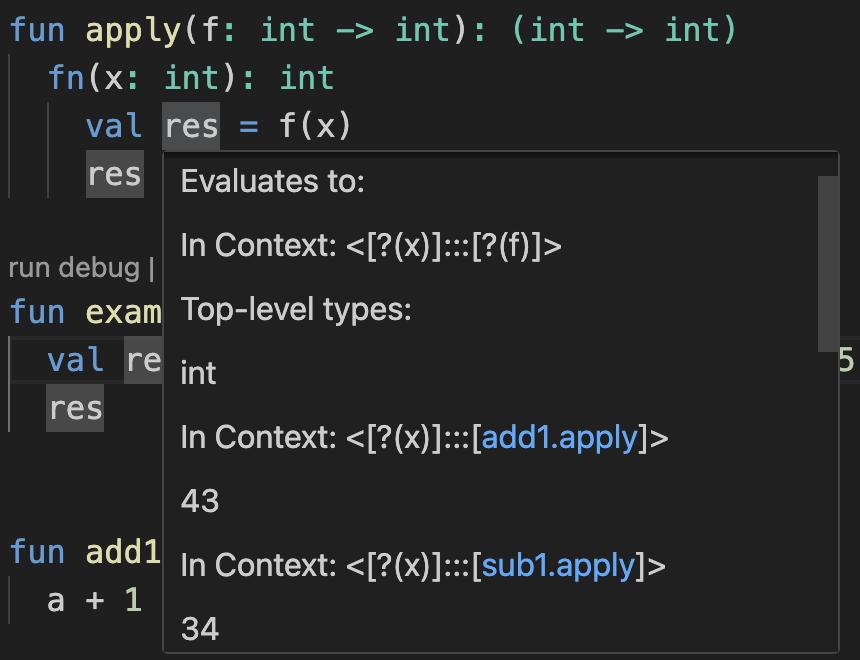
Hover over the res variable or the f(x) call inside the apply function. You will see that the analysis maintains context sensitivity. It distinguishes between the two different invocation contexts of apply. The hover information will show you the specific contexts and their associated values—revealing that in one context f is bound to add1, and in the other context f is bound to sub1, and the values of res for each context.
fun apply(f: int -> int): (int -> int)
  fn(x: int): int
    val res = f(x)
    res

fun example()
  val res = apply(add1)(42) + apply(sub1)(35)
  res

fun add1(a: int): int
  a + 1

fun sub1(s: int): int
  s - 1
Analysis Output: As shown below, hovering over
resreveals the precise types and flow information inferred by the Demand CFA, clearly distinguishing the different calling contexts.
Origin Determination (debug.kk)
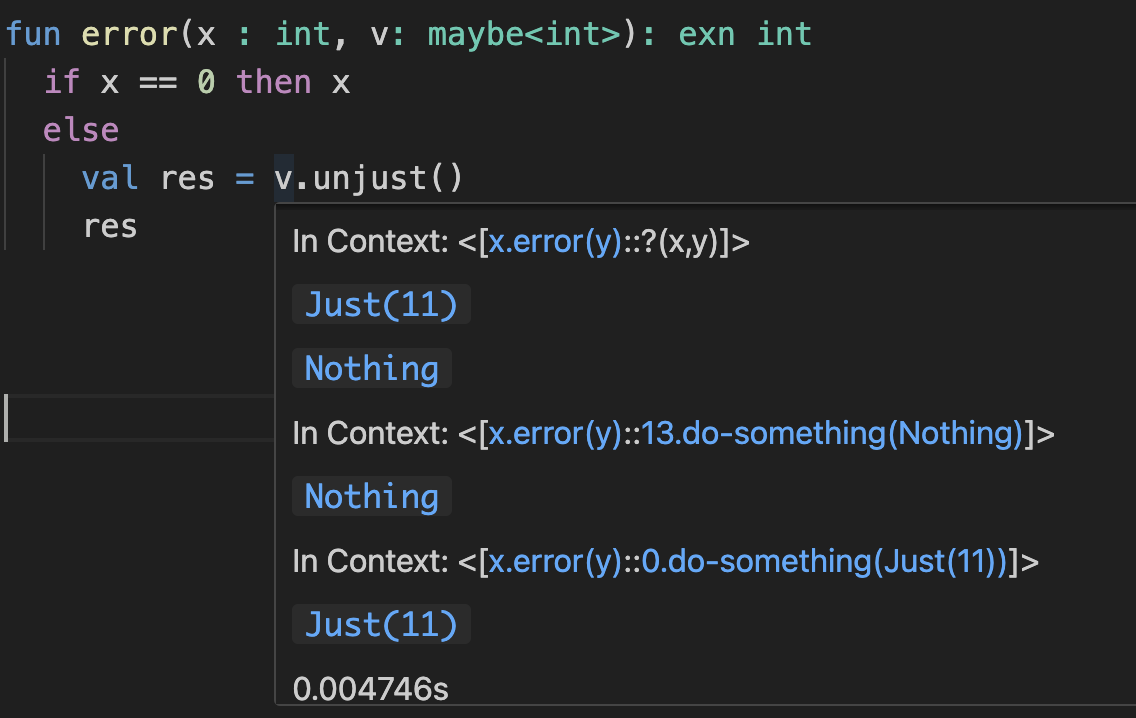
This snippet demonstrates tracing the origin of an exceptional flow, such as calling .unjust() on a Nothing value.
What to look for:
Hover over v inside the error function. The Demand CFA hover information traces the data flow backward to reveal the precise origins of the values reaching that point. It will show you the specific contexts (the call from test1 via do-something) and the exact values associated with those contexts (Nothing vs Just(11)), making it trivial to debug exactly where the failing Nothing originated.
// Demo for debugging / tracing the source of an error (from unjust / Nothing)

fun error(x : int, v: maybe<int>): exn int
  if x == 0 then x
  else
    val res = v.unjust()
    res

fun test0()
  error(10, Just(10))
  if False then
    val res = error(0, Nothing)
    ()

fun do-something(x: int, y: maybe<int>)
  println(x.show)
  if x == 0 then error(x, y) else x
  error(x, Just(x))

fun test1()
  val res1 = do-something(13, Nothing)
  val res2 = do-something(0, Just(11))
  ()
Analysis Output: Tracing where the value of
vcomes from, the analysis determines the possible origins of the failingNothingvalue and visualizes the precise data flow path directly in the editor hover.